Compare InventoryOS + ManagedOS
ManagedOS vs Liongard
Liongard focuses on documenting your clients’ systems. InventoryOS + ManagedOS gives you live inventory of devices, users, software, and licensing, then turns it into service plans, quotes, reconciled bills your clients sign off on, and approved changes written back to your PSA.

Why MSPs choose InventoryOS + ManagedOS
Inventory that pays for itself.
Inventory
Every device, user, and license
InventoryOS agents and directory sync keep a live picture of every client, ready for billing, not just documentation.
Billing
Reconcile and update the PSA
Line up vendor counts, seats in use, the plan, and PSA billing, then write approved changes back in one click.
Client sign-off
Clients confirm before you invoice
Monthly client reviews show each client their devices, users, and charges, and they confirm or flag changes.
Margin
Find the money you’re losing
Margin leakage shows unbilled seats, prices below cost, unused seats, and licensed users who stopped signing in.
Side by side
Liongard vs InventoryOS + ManagedOS.
InventoryOS supplies inventory, assets, licensing, and RMM data. ManagedOS adds MSP billing and operations. You get both.
| Capability | Liongard | InventoryOS + ManagedOS |
|---|---|---|
| Device, user, and software inventory | Yes | Yes. InventoryOS agents (under 15 MB), Microsoft 365 and Google Workspace sync, assets, network discovery, and mobile |
| Licensing reconciliation against your plans | Usage reports | Yes. Vendor counts, seats in use, the plan, and PSA billing on one screen, with Sherweb, Pax8, and more |
| Approved billing changes written to your PSA | — | Yes. Approve one line or a whole batch in one click, and ManagedOS updates the agreement quantity in your PSA, right away or on the date you choose. |
| Service plans and price policies | — | Yes. Plans priced per device type, with overrides for healthcare, nonprofit, or legacy clients |
| Quotes that become clients | — | Yes. Branded quotes from your plans. A signed quote creates the client and assigns the plan |
| Plan-based onboarding | — | Yes. A checklist per client, with Service Plan Check for products not yet connected |
| Client sign-off on the monthly bill | — | Yes. Monthly client reviews: clients confirm their bill or flag what changed |
| Margin leakage | — | Yes. Unbilled seats, prices below cost, unused seats, and inactive licensed users |
| PSA health checks | — | Yes. Unassigned, stalled, and scheduled-but-open tickets, billing mismatches, and long time entries |
| PSA tickets from alerts | Yes | Yes. 33 alert types, rechecked every 15 minutes with no duplicates, and an optional RMM fix first |
| Pricing | See their site | Special MSP and reseller pricing, shared on a call |
Beyond inventory
Your inventory, in front of the client.
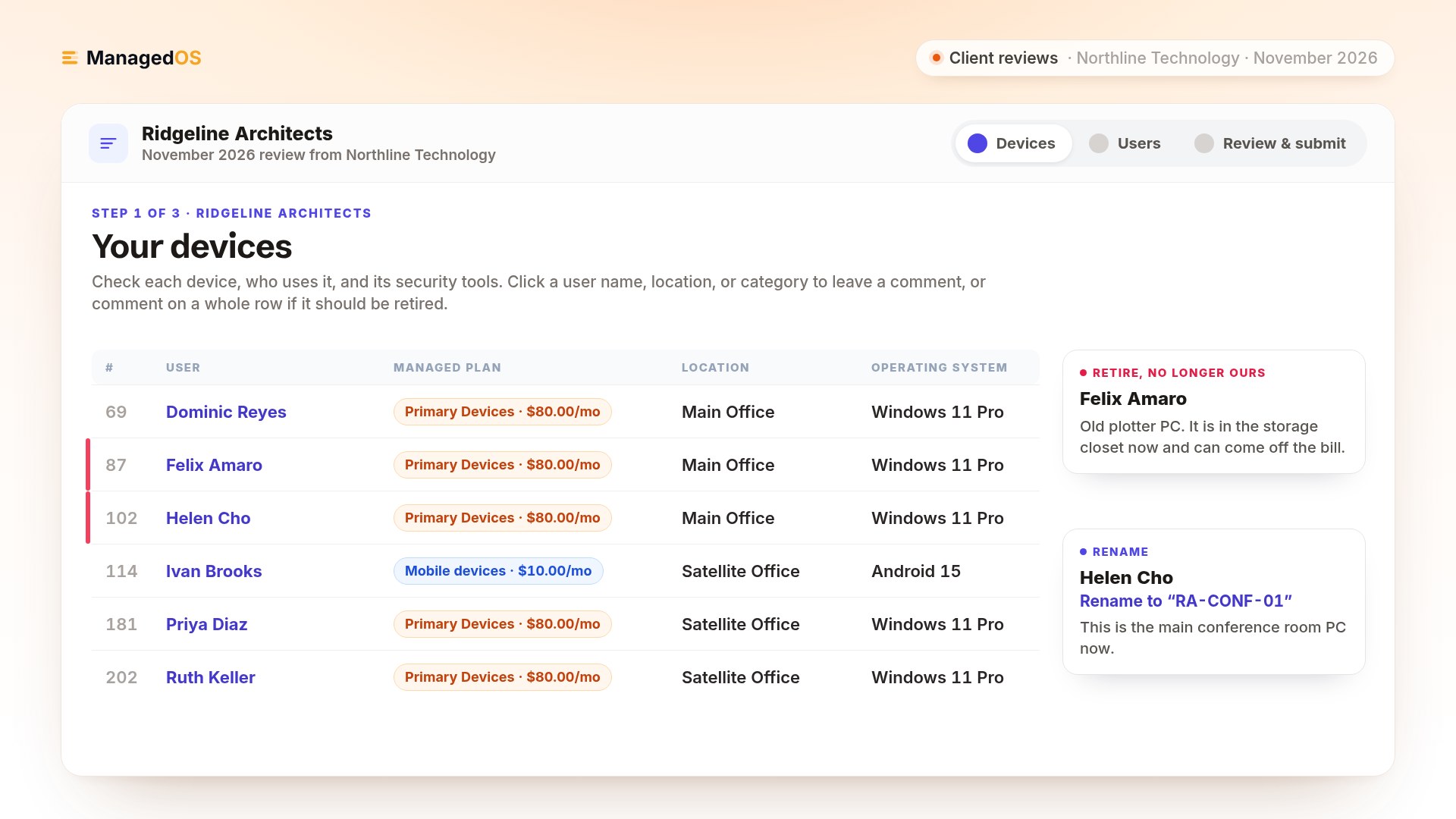
Every month ManagedOS turns each client’s devices, users, and service plan into a review they can check. They retire a device, offboard a user, or confirm everything looks right, and you bill exactly what they agreed to.
Getting started
Getting started is simple.
MSP accounts are set up after a short call, and we connect your PSA, distributors, and the tools you already run with you.
1Connect what you already useYour PSA and distributors connect under Integrations. ManagedOS works with ConnectWise Manage, HaloPSA, Autotask, Kaseya BMS, Pulseway PSA, and Syncro.
2See what’s really in useInventoryOS agents and Microsoft 365 or Google Workspace sync show every device, user, and license, client by client.
3Run your first monthBuild service plans, reconcile, write approved changes to your PSA, and send client reviews from one place.
FAQ
Questions MSPs ask.
How is InventoryOS + ManagedOS different from Liongard?
InventoryOS + ManagedOS is built to run and bill managed services. Live inventory of devices, users, software, and licensing feeds service plans, quotes, onboarding, usage reconciliation, PSA updates, and monthly client sign-off, all on one platform.
Does InventoryOS inventory devices and users?
Yes. Lightweight InventoryOS agents report every device, Microsoft 365 and Google Workspace sync bring in users, and assets, network discovery, and mobile devices sit alongside them, for every client.
Does ManagedOS write billing changes back to my PSA?
Yes. Approve one line or a whole batch in one click, and ManagedOS updates the agreement quantity in your PSA, right away or on the date you choose. Every change is logged with who approved it and the before and after values.
Which PSAs does it work with?
ManagedOS works with ConnectWise Manage, HaloPSA, Autotask, Kaseya BMS, Pulseway PSA, and Syncro, and auto-tickets open in ConnectWise Manage, HaloPSA, and Autotask.
How is it priced?
MSPs and resellers get special pricing, shared on a call. Book an MSP demo to see it on your own clients.
See InventoryOS + ManagedOS on your own clients.
Bring your PSA and a client or two. We’ll show you live inventory, service plans, client reviews, and PSA write-back on real screens.
InventoryOS + ManagedOS has special MSP and reseller pricing, shared on a call.